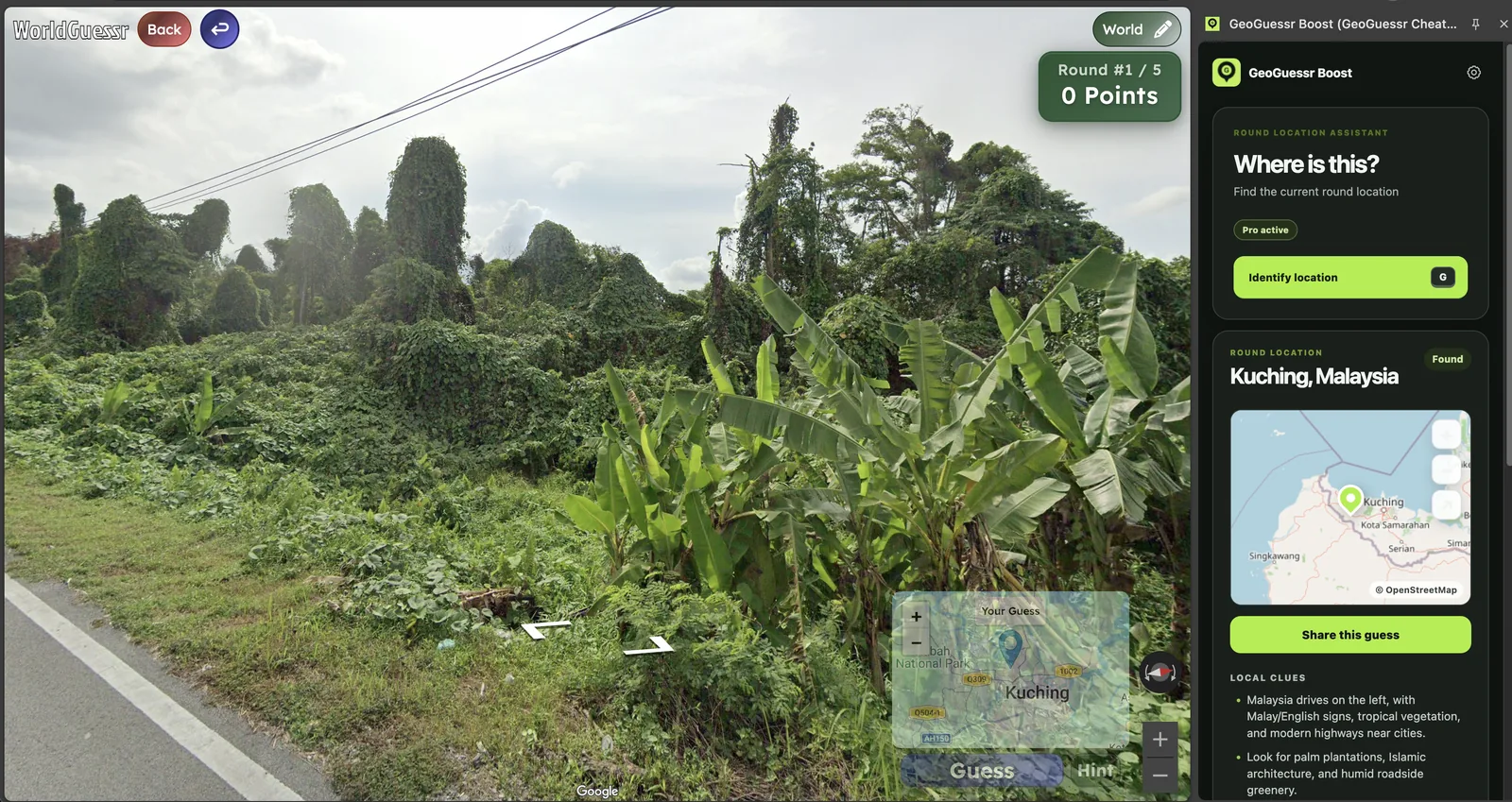
WorldGuessr cheat is a high-intent search: the player wants a faster path from a confusing round to a useful map decision. This guide explains the practical use case, what to verify manually, where GeoBoost helps, and where helper tools should stay out of the game.
Built for supported private games, practice, testing, party rounds, and personal entertainment.
Independent product, not affiliated with GeoGuessr.
Supported round. Exact.Map point foundCoordinates
Updated
Tested with
GeoBoost 1.0.9
Intended use
Private, practice, and testing rounds
Known limits
Supported modes only; never ranked or competitive play
01
Best use cases
Use this workflow when the goal is speed, feedback, or an agreed private-game reveal, not when other players expect strict manual guessing.
WorldGuessr cheat should answer a concrete player job, not act like a generic promise. The page is built around supported rounds, private rules, and a faster feedback loop.
private WorldGuessr sessions with agreed helper rules
practice rounds where you guess before revealing
testing the exact WorldGuessr mode you plan to play
02
A practical workflow
A good helper workflow still has order. The round should move from a quick visual read to a supported check, then to placement or review.
Open a supported WorldGuessr round in Chrome.
Make a country or region read from the visible scene.
Press G or run Identify location in the GeoBoost side panel.
Compare the returned place and map with the scene before sharing or placing the answer.
03
Manual clues to check
Even with a helper, the most useful players keep a short clue checklist. It makes the result easier to trust and turns a reveal into practice.
driving side and lane markings
language, road signs, and utility poles
climate and vegetation
whether the current WorldGuessr page and rules allow helper use
04
Where GeoBoost fits
GeoBoost works as a WorldGuessr helper inside Chrome. On a supported round it can return a readable place, map preview, local clues, and placement controls without requiring a separate WorldGuessr-specific script.
05
Limits and fair-use context
WorldGuessr controls its own pages and modes, so compatibility can change. Test the exact mode with the free quota and keep the extension out of public, ranked, or no-helper play.
06
What a supported WorldGuessr result looks like
The product screenshot on this page comes from a live WorldGuessr test. GeoBoost identified the round as Kuching, Malaysia and displayed the result in the Chrome side panel while the WorldGuessr scene remained visible. That is the intended workflow: inspect the scene, request the supported result, verify it against the map, then decide whether to reveal or place it.
The side panel keeps the answer separate from the game's own controls. You can compare tropical vegetation, driving side, road construction, and regional map context before acting. That makes the same workflow useful for an agreed party reveal or for a manual-first practice loop.
07
WorldGuessr cheat, helper, and extension searches describe one intent
People use different words for the same practical need: WorldGuessr cheat when they want the answer, WorldGuessr helper when they want context, and WorldGuessr extension when they care about the installation format. GeoBoost keeps those needs on one page because the product and supported-use limits are the same.
Install the extension once, test the current WorldGuessr mode for free, and use the smallest action that matches the session. A reveal is enough for review; Auto Place is only useful when placement is supported and explicitly allowed.
 GeoBoost