Geotastic cheat is a high-intent search: the player wants a faster path from a confusing round to a useful map decision. This guide explains the practical use case, what to verify manually, where GeoBoost helps, and where helper tools should stay out of the game.
Built for supported private games, practice, testing, party rounds, and personal entertainment.
Independent product, not affiliated with GeoGuessr.
Supported round. Exact.Map point foundCoordinates
Updated
Tested with
GeoBoost 1.0.9
Intended use
Private, practice, and testing rounds
Known limits
Supported modes only; never ranked or competitive play
01
Best use cases
Use this workflow when the goal is speed, feedback, or an agreed private-game reveal, not when other players expect strict manual guessing.
Geotastic cheat should answer a concrete player job, not act like a generic promise. The page is built around supported rounds, private rules, and a faster feedback loop.
private Geotastic games with disclosed helper use
personal location practice
testing supported Geotastic rounds before choosing Pro
02
A practical workflow
A good helper workflow still has order. The round should move from a quick visual read to a supported check, then to placement or review.
Open a supported Geotastic round in Chrome.
Use the road scene to make a manual country or region decision.
Press G in GeoBoost to identify the supported location.
Check the returned map and local context, then reveal or place only when the session rules permit it.
03
Manual clues to check
Even with a helper, the most useful players keep a short clue checklist. It makes the result easier to trust and turns a reveal into practice.
driving side, road width, and markings
climate, vegetation, and road furniture
map agreement between Geotastic and GeoBoost
whether the current mode exposes supported round data
04
Where GeoBoost fits
GeoBoost acts as a Geotastic helper through the same Chrome side panel used for the other supported geography games. The result stays visible next to the round and can include a place name, map preview, and local clues.
05
Limits and fair-use context
Geotastic can change its interface or data flow independently. Compatibility is mode-specific, and assisted play should remain outside competition or any room that prohibits external tools.
06
What GeoBoost returned in the tested Geotastic round
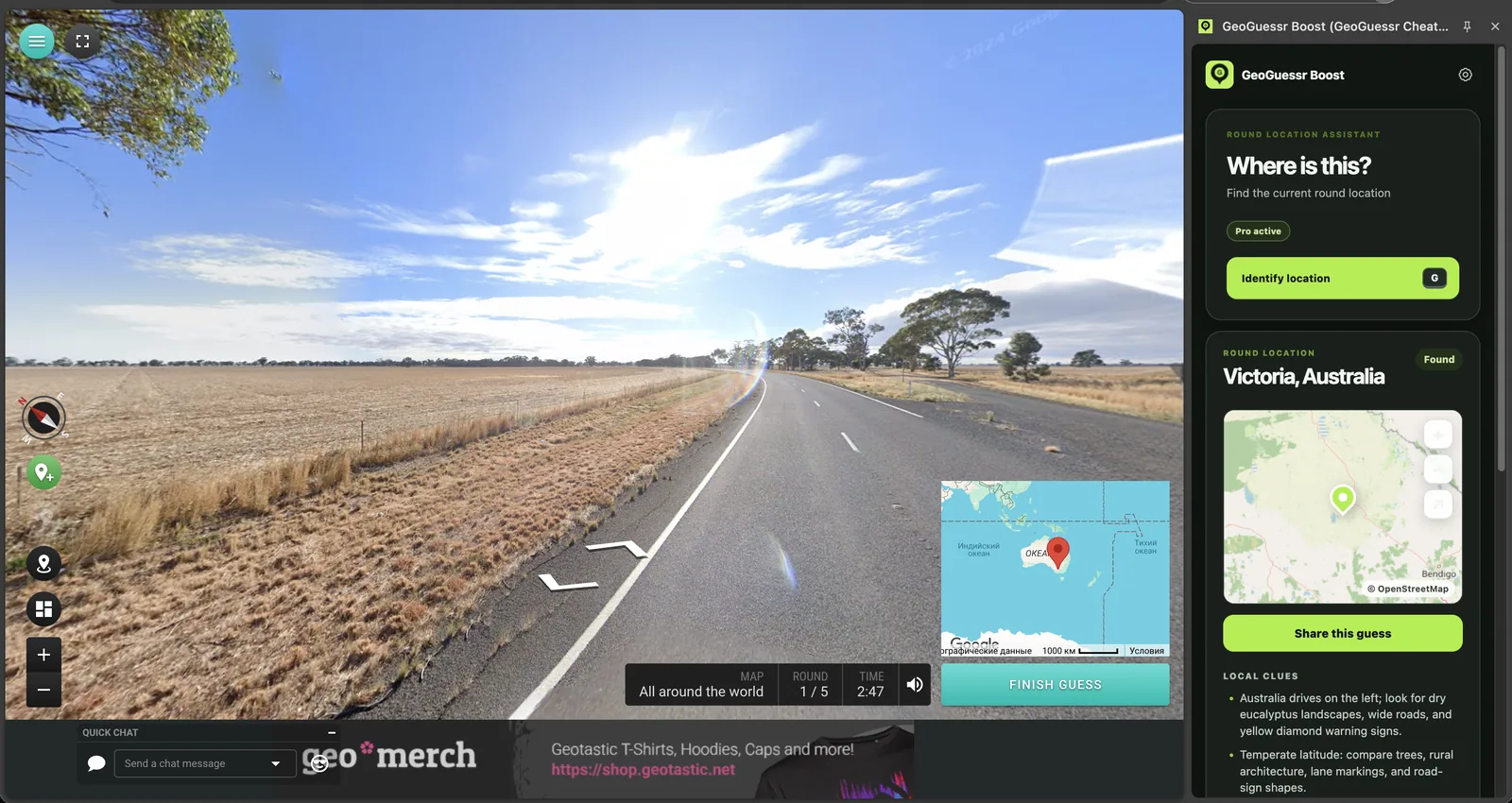
The page screenshot shows a real supported Geotastic test in which GeoBoost identified the scene as Victoria, Australia. Geotastic's own world map and round controls remain on the left, while the GeoBoost side panel displays the found region and a closer map preview on the right.
The result can be checked against the visible evidence: left-side driving, dry agricultural land, eucalyptus-like trees, broad paved roads, and Australian road geometry. This proof connects the feature to the job instead of asking the visitor to trust a generic compatibility claim.
07
Choose between an immediate reveal and a practice check
An immediate Geotastic reveal is useful when a private group values pace and has agreed that helpers are part of the format. A practice check should come after a committed guess, because the contrast between your prediction and the returned location is what makes the clue memorable.
GeoBoost supports both jobs without changing the product: one key requests the result, the side panel supplies proof, and you decide how to use it. Keep Auto Place off when a manual review is the goal or when the Geotastic mode does not support placement.
Yes, on supported Geotastic rounds. Use the free quota to verify the exact mode before relying on it.
Is this a Geotastic hack?
It is a user-triggered Chrome extension workflow, not access to Geotastic servers. Use it only in private, practice, or testing contexts where helpers are allowed.
Do I need to upload a screenshot?
No. On a supported round, GeoBoost works beside the open game page; there is no separate screenshot-upload step.
 GeoBoost